---
title: "Getting Started: Logic Demo"
slug: "getting-started-logic-demo"
updated: 2026-04-28T17:18:03Z
published: 2026-04-28T17:18:03Z
canonical: "guide.youraspire.com/getting-started-logic-demo"
---
> ## Documentation Index
> Fetch the complete documentation index at: https://guide.youraspire.com/llms.txt
> Use this file to discover all available pages before exploring further.
# Getting Started: Logic Demo
Purpose
Hi there! 👋 You might be new to Aspire. If so, welcome aboard. 🚢 While we have a lot of great individual videos for your learning, the below video puts the individual pieces together to create the big picture. In this video, you'll:
- Learn the Workflow of Aspire
- Discover how to navigate to the different modules in your Aspire system
- Understand how each module relates to other modules
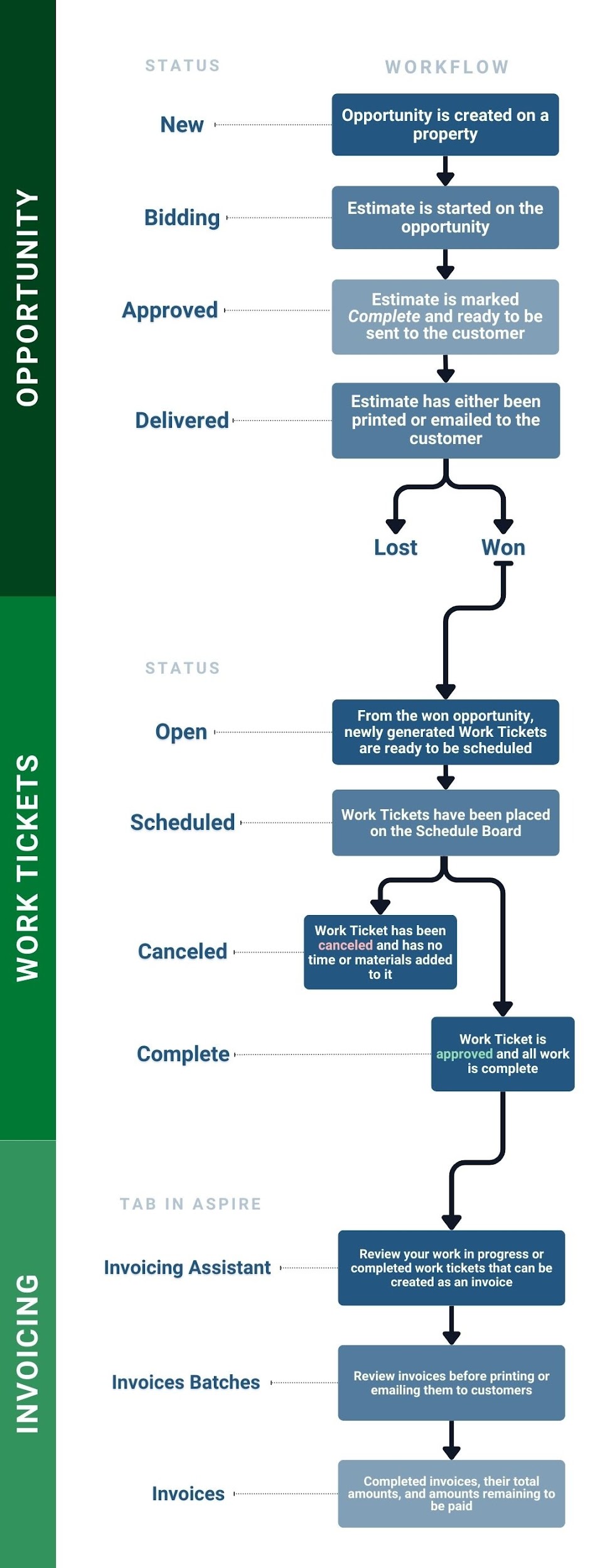
- Review a high level overview of the workflow for an *Opportunity,* its' *Work Tickets,* and *Invoicing.*
[100 Logic Demo - Workflow in Aspire Video](https://fast.wistia.net/embed/iframe/wf7gdahfye?web_component=true&seo=true&videoFoam=false)
Workflow Overview on Opportunities, Work Tickets, and Invoicing in Aspire
If you need to review a high level overview on the workflow for *Opportunities, Work Tickets* and *Invoices*, review the chart below!
🎓 *Aspire Academy* has more details regarding these workflows with courses specific to *User Roles* that will be working primarily in these modules for their daily tasks.
For more information on those, click [here!](https://guide.youraspire.com/docs/all-about-the-aspire-academy)