---
title: "Work Ticket System Clean-Up Workflow"
slug: "work-ticket-system-clean-up-workflow"
tags: ["Language - English", "Area - Work Tickets", "Industry - Landscaping", "Type - Task (How-To)", "Role - Account Manager", "Role - Branch Manager", "Role - Project Manager", "Role - Operations Manager", "Role - System Admin", "Role - Branch Admin", "Role - Sales Rep", "Skill Level - 2 (Intermediate)"]
updated: 2025-10-29T14:25:52Z
published: 2025-10-29T14:25:52Z
canonical: "guide.youraspire.com/work-ticket-system-clean-up-workflow"
---
> ## Documentation Index
> Fetch the complete documentation index at: https://guide.youraspire.com/llms.txt
> Use this file to discover all available pages before exploring further.
# Work Ticket System Clean-Up Workflow
Purpose
There are instances when work tickets will need to be cleaned up and removed in Aspire. The below is a flowchart that walks users through the steps necessary to complete these actions. ⚠️ The user who is completing the clean up must have a good understanding of what is happening at a job level, as well as knowledge of change orders and credit memos.
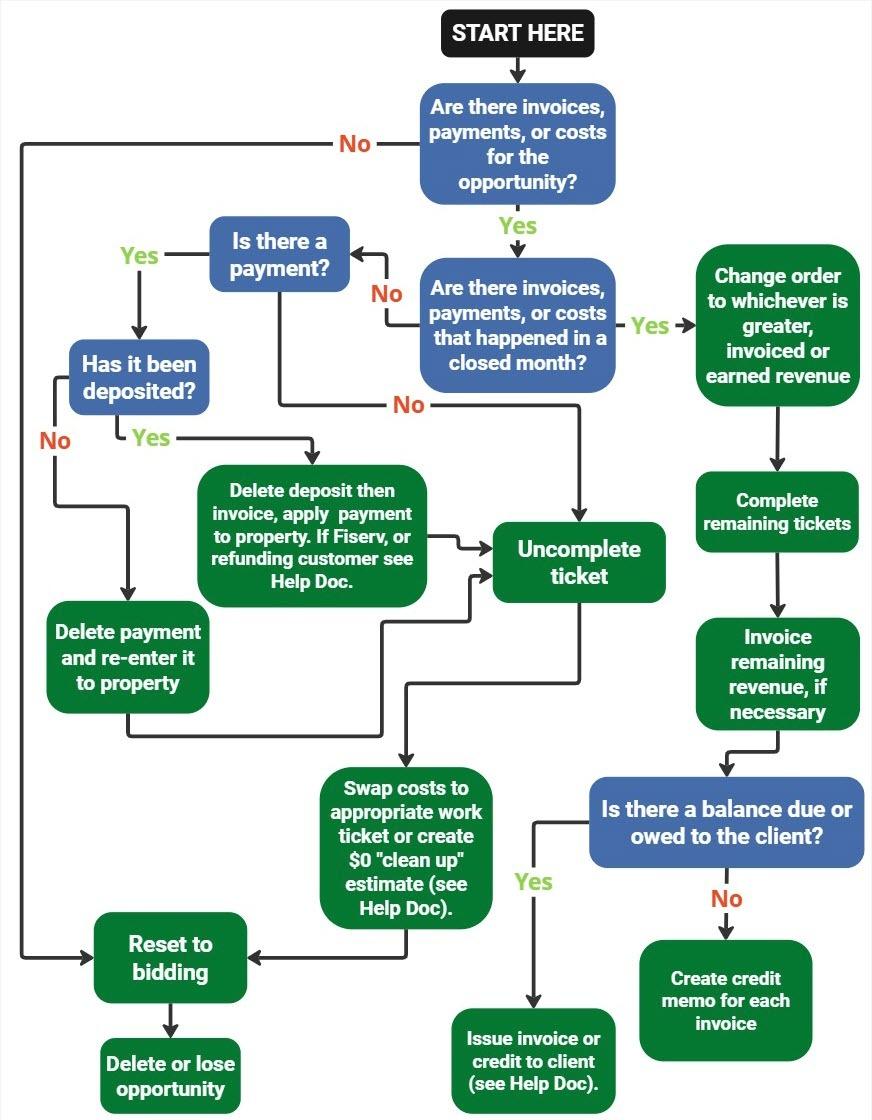
Referenced Help Docs:
- Delete deposit then invoice, apply payment to property. Learn how to issue invoices, or add credits. Read our documentation about refunds to customers [here](https://guide.youraspire.com/docs/how-to-refund-payments-record-returned-payments-or-move-payments-applied-to-the-wrong-invoice).
- Swap costs to appropriate work ticket documentation, [here.](https://guide.youraspire.com/docs/swapping-work-ticket-costs)