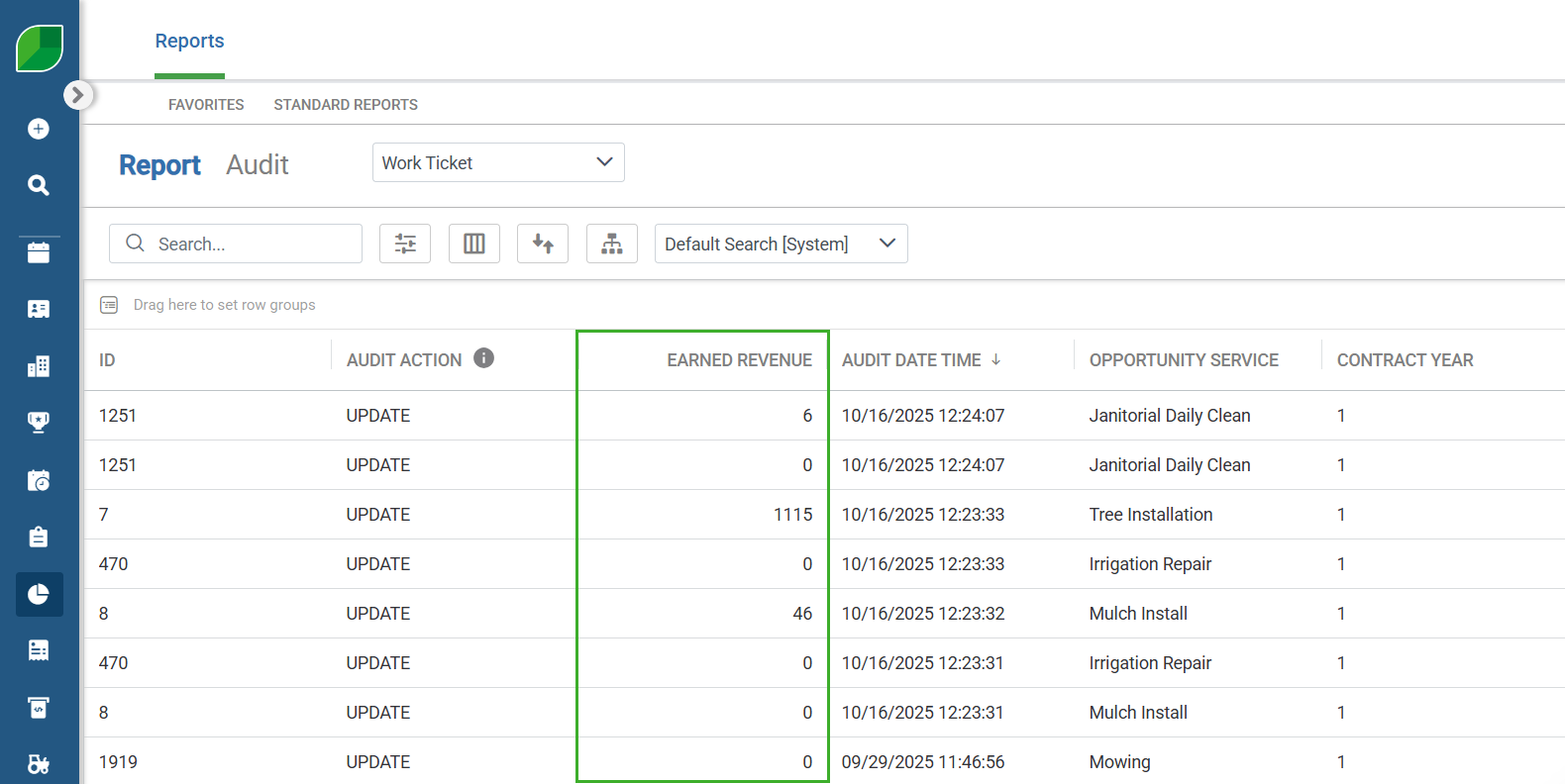
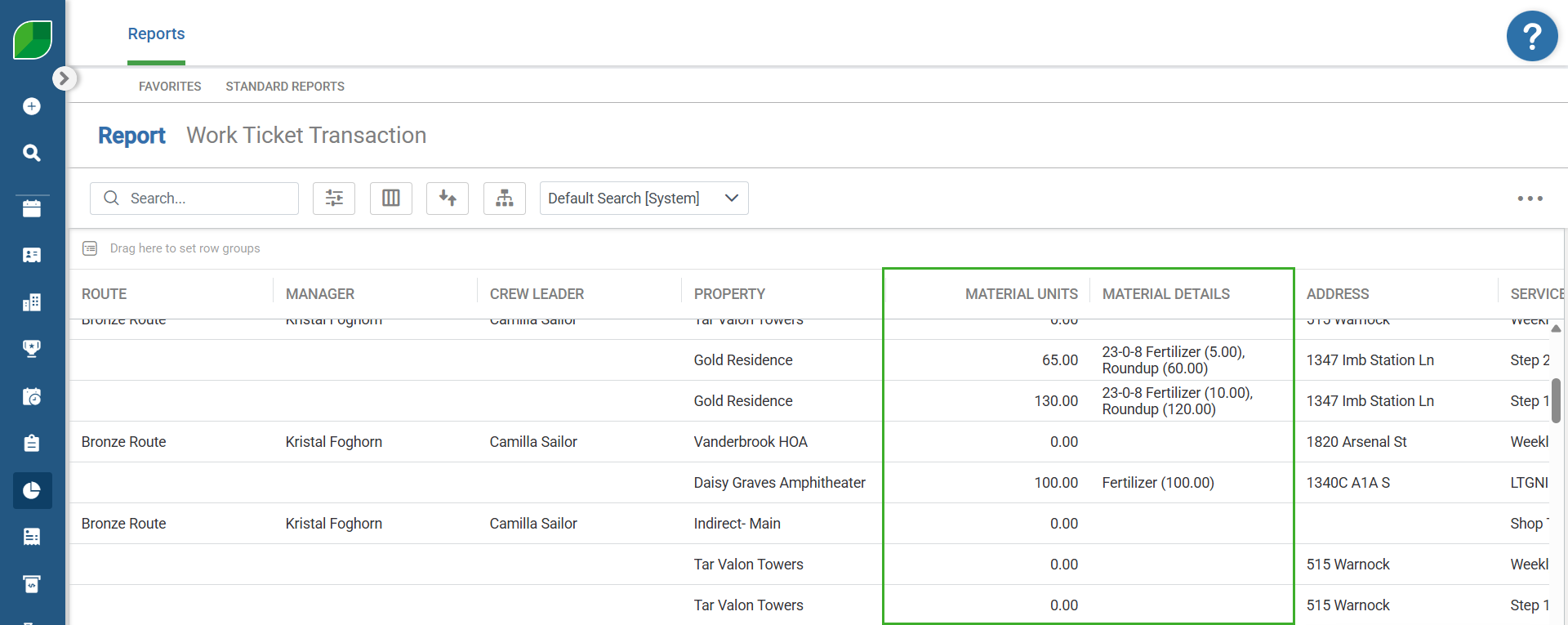
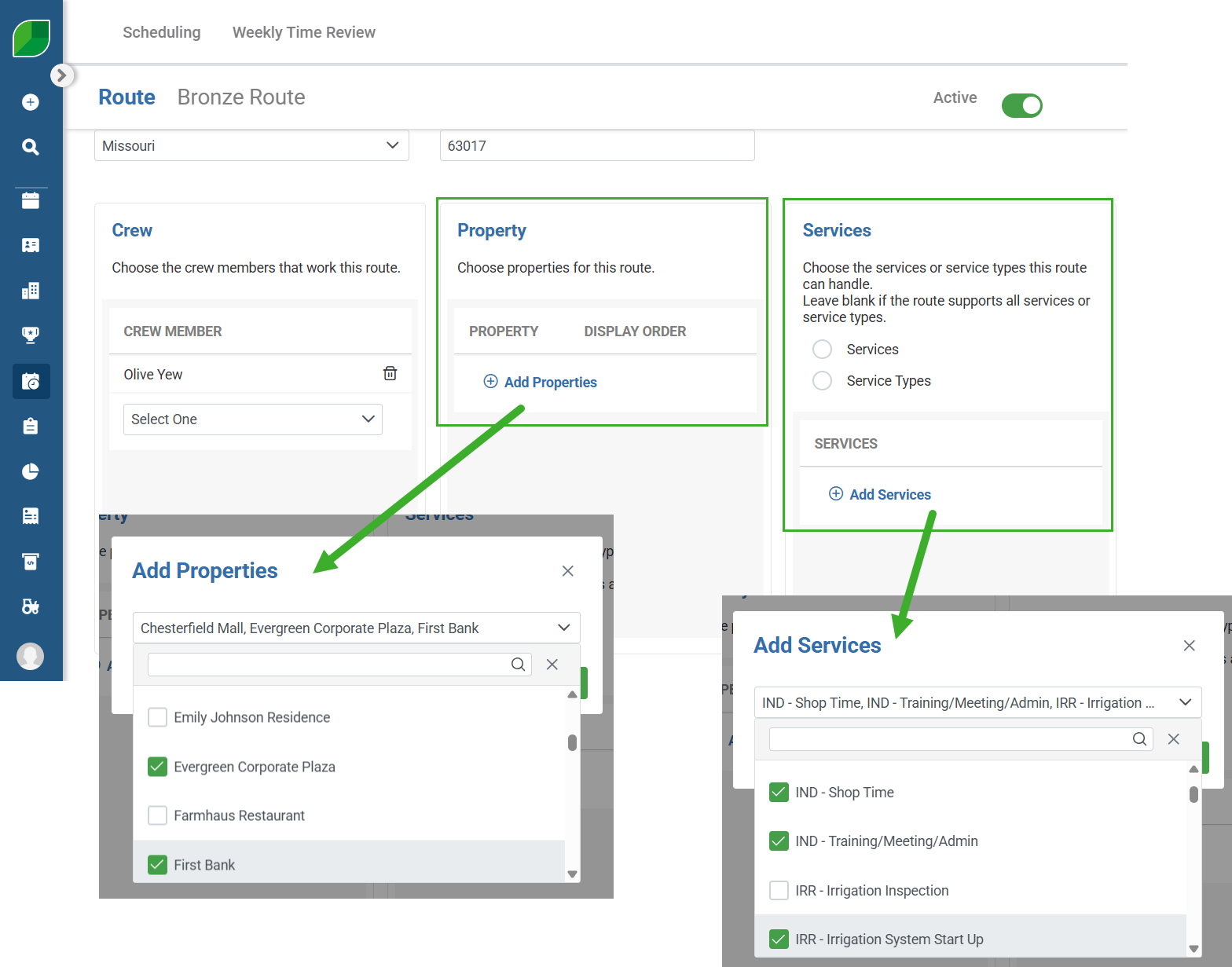
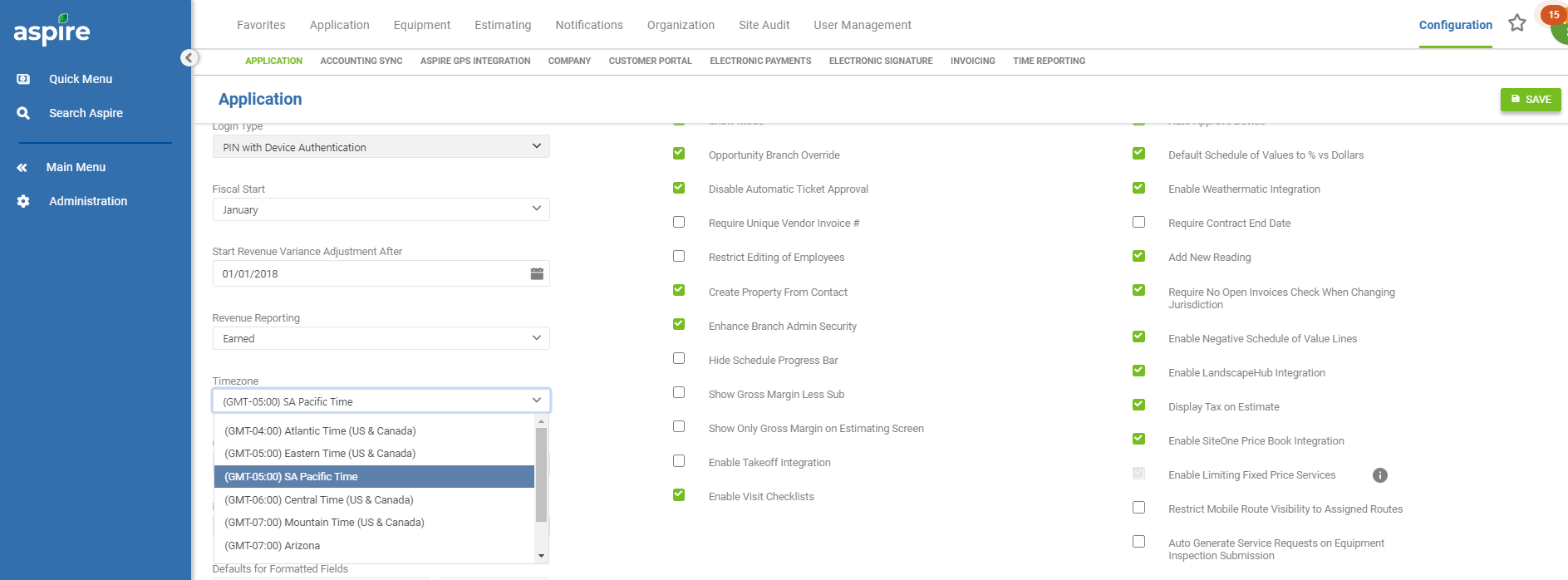
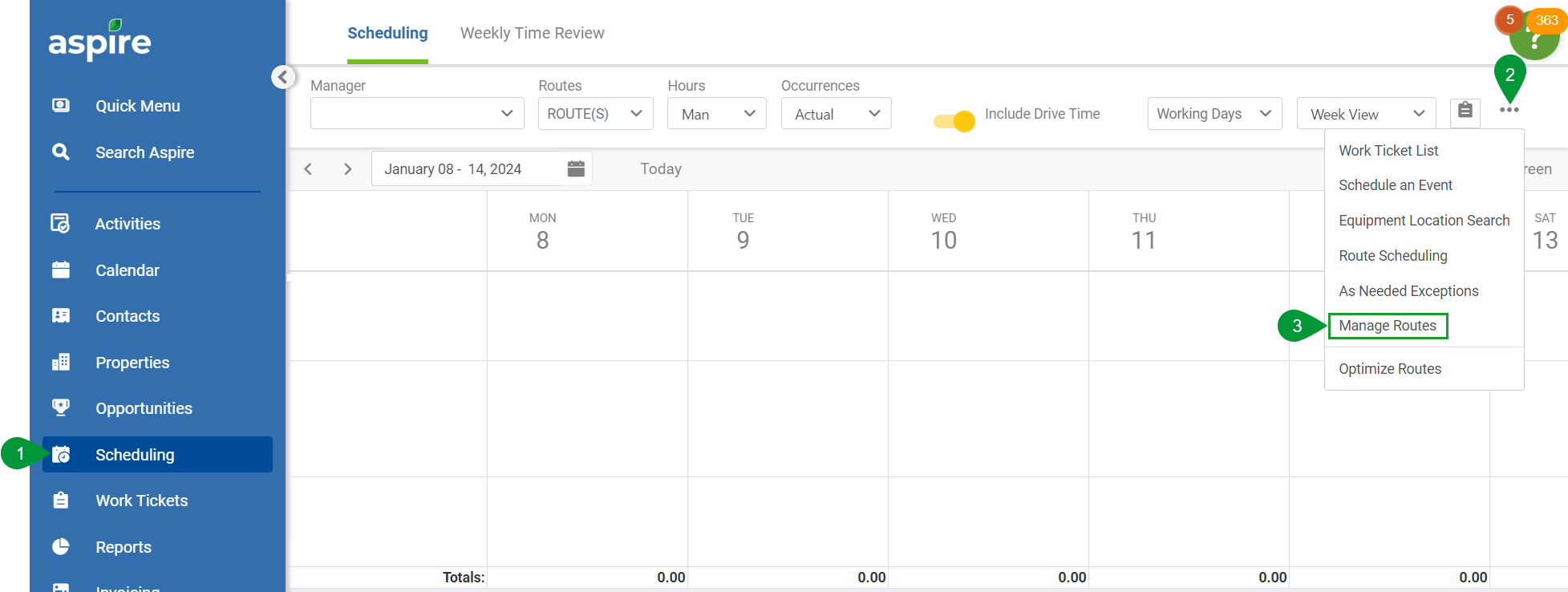
--- title: "6.15.0 CRM Enhancements" slug: "6150-crm-enhancements" updated: 2025-10-28T20:39:34Z published: 2025-10-28T20:39:34Z canonical: "guide.youraspire.com/6150-crm-enhancements" excludeFromSearch: true --- > ## Documentation Index > Fetch the complete documentation index at: https://guide.youraspire.com/llms.txt > Use this file to discover all available pages before exploring further. # 6.15.0 CRM Enhancements ![](https://cdn.document360.io/5942a8d7-f3b1-4919-bdfa-d477d8498fe3/Images/Documentation/Aspire%20header(59).png?sv=2026-02-06&spr=https&st=2026-11-13T10%3A42%3A28Z&se=2026-11-13T11%3A42%3A28Z&sr=c&sp=r&sig=O2Av%2Fgc19aWZ%2FEhjbXId6%2FM7YHeoaW0Z1QcYKdloFWI%3D)6.15.0 CRM Enhancements --- Here is a list of the CRM improvements within the 6.15.0 release. - Use the new [Sales Pipeline Insight KPI](/may-2021/docs/sales-pipeline-widget) to monitor[](/may-2021/docs/sales-pipeline-widget) your pipeline.  - The **Earned Revenue** field can now be displayed, filtered, sorted, and grouped on the audit report for work tickets**.**  ![](https://cdn.document360.io/5942a8d7-f3b1-4919-bdfa-d477d8498fe3/Images/Documentation/Earned%20Revenue%20on%20Work%20Ticket%20Audit%20Report.png?sv=2026-02-06&spr=https&st=2026-11-13T10%3A42%3A28Z&se=2026-11-13T11%3A42%3A28Z&sr=c&sp=r&sig=O2Av%2Fgc19aWZ%2FEhjbXId6%2FM7YHeoaW0Z1QcYKdloFWI%3D) - **Material Units** and **Materials Details** of individual items can now be displayed on the **Work Ticket Transaction Report**. ![](https://cdn.document360.io/5942a8d7-f3b1-4919-bdfa-d477d8498fe3/Images/Documentation/Material%20Qualities%20on%20the%20Work%20Ticket%20Transaction%20Report.png?sv=2026-02-06&spr=https&st=2026-11-13T10%3A42%3A28Z&se=2026-11-13T11%3A42%3A28Z&sr=c&sp=r&sig=O2Av%2Fgc19aWZ%2FEhjbXId6%2FM7YHeoaW0Z1QcYKdloFWI%3D) - The **Property** and **Services** fields on a selected route screen are now multi-select dropdowns, so you can quickly search, select, and add multiple properties and services to a route.![](https://cdn.document360.io/5942a8d7-f3b1-4919-bdfa-d477d8498fe3/Images/Documentation/Property%20and%20Services%20dropdowns.png?sv=2026-02-06&spr=https&st=2026-11-13T10%3A42%3A28Z&se=2026-11-13T11%3A42%3A28Z&sr=c&sp=r&sig=O2Av%2Fgc19aWZ%2FEhjbXId6%2FM7YHeoaW0Z1QcYKdloFWI%3D) - The company logo uploaded for your branch in Aspire will appear in the **Sub Portal** for your subcontractors to view. - Add the **(GMT-5:00) SA Pacific Standard Time** timezone to the Aspire system. ![](https://cdn.document360.io/5942a8d7-f3b1-4919-bdfa-d477d8498fe3/Images/Documentation/image-1692229771713.png?sv=2026-02-06&spr=https&st=2026-11-13T10%3A42%3A28Z&se=2026-11-13T11%3A42%3A28Z&sr=c&sp=r&sig=O2Av%2Fgc19aWZ%2FEhjbXId6%2FM7YHeoaW0Z1QcYKdloFWI%3D) ![](https://cdn.document360.io/5942a8d7-f3b1-4919-bdfa-d477d8498fe3/Images/Glossary/image-1677081411761.png?sv=2026-02-06&spr=https&st=2026-11-13T10%3A42%3A28Z&se=2026-11-13T11%3A42%3A28Z&sr=c&sp=r&sig=O2Av%2Fgc19aWZ%2FEhjbXId6%2FM7YHeoaW0Z1QcYKdloFWI%3D) Scheduling > Hamburger Menu > Manage Routes